Search This Blog

Powered by Blogger.

Translate

There's a 'Desert' in The Middle of The Pacific. Here's What Lives There

In the centre of the South Pacific, there's a place as far away from land as anyone on Earth could ever hope to get. The ocean is different there.

These distant waters lie at the heart of the South Pacific Gyre, the centre of which holds the 'oceanic pole of inaccessibility': the ocean's remotest extreme, aka Point Nemo (a name meaning 'no-one'), famous otherwise for being a spacecraft cemetery.

But aside from the ghosts of burnt-up satellites, what dwells under these far-off waves?

Not much, scientists have long thought. Despite taking up 10 percent of the ocean's surface, the South Pacific Gyre (SPG) – the largest of Earth's five giant ocean-spanning current systems – is generally considered a 'desert' in terms of marine biology.

Nonetheless, stuff does live there, even if organic life in these waters (and the seabed below it) is few and far between, due to a range of factors.

These include distance from land (and the nutrient matter it provides), the way water swirling currents isolate the centre of the gyre from the rest of the ocean, and high UV levels in this part of the ocean.

In truth, though, we don't actually know all that much about the life-forms that inhabit the SPG, largely because of how hard it is to study this oceanic desert – due to both its extreme remoteness, and also how large it is, covering about 37 million square kilometres (14 million square miles).

Despite the challenges, a recent international research effort has given us what the scientists claim is an unparalleled glimpse at the microbial creatures that exist in these waters.

During a six-week expedition aboard the German research vessel FS Sonne from December 2015 to January 2016, a crew led by the Max Planck Institute for Marine Microbiology sailed a 7,000-kilometre (4,350 miles) journey through the SPG from Chile to New Zealand.

En route, they sampled the microbial populations of the remote waters at depths between 20 to 5,000 metres (65 ft to 16,400 ft), using a newly developed analysis system that enabled the researchers to sequence and identify organic samples en route in as little as 35 hours.
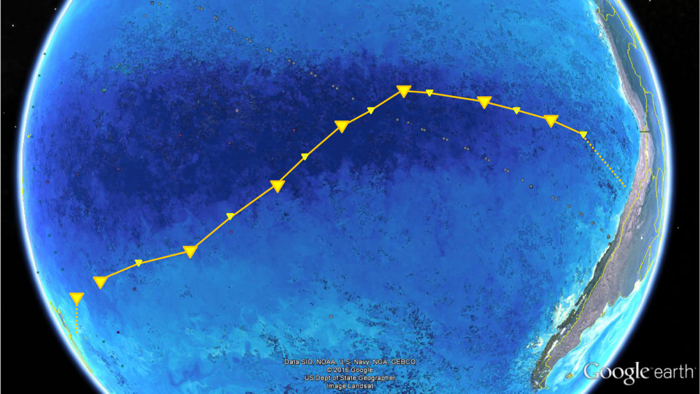
016 south pacific gyre 1 (Max Planck Institute for Marine Microbiology/Google Earth/NASA)

Above: FS Sonne's path crossing the SPG from Chile to New Zealand.

"To our surprise, we found about a third less cells in South Pacific surface waters compared to ocean gyres in the Atlantic", said one of the researchers, microbial ecologist Bernhard Fuchs, back in July 2019.

"It was probably the lowest cell numbers ever measured in oceanic surface waters."

Among the microbes the team found, 20 major bacterial clades dominated the lot. These were mostly organisms scientists have encountered in other gyre systems, such as SAR11, SAR116, SAR86, Prochlorococcus, and more.

The distribution of these microbe communities depended largely on water depth, based around factors such as changes in temperature, nutrient concentrations, and availability of light.

One of the populations identified, called AEGEAN–169, was particularly numerous in the surface waters of the SPG, whereas previous research had only discovered them at 500-metre depths.

"This indicates an interesting potential adaptation to ultraoligotrophic [low in biological productivity] waters and high solar irradiance", said one of the team, microbiologist Greta Reintjes.

"It is definitely something we will investigate further."

On the whole though, the sampling generally confirmed that the SPG is a "unique, ultraoligotrophic habitat", where low nutrient availability restricts growth to specialist oligotrophic organisms and creatures that have adapted to "extreme physicochemical conditions".

In other words, the SPG can't shake off its 'desert' reputation just yet, but there is a bright side to all that organic absence: these distant, almost lifeless waters are said to be the clearest ocean in all the world.

The findings were reported in Environmental Microbiology.

A version of this article was first published in July 2019.


Source: https://www.sciencealert.com

[TC] Arduino Video Game for the Neighbourhood update 2014


My house/office has a store window and I try to make use of it as much as possible. I had some projections etc. in there before, but now I wanted to make something interactive. We have a lot of loitering youth and many people passing by. To appeal to a wide audience, I thought it would be nice to make an old fashion arcade box like thing.
It’s now on the street for one day and people really seem to like it. Age or background doesn’t make a difference.
To make it a little bit more challenging,  I thought it would be fun to try to run the hole thing on an Arduino without an external computer. Just to see how much power it actually has. And while I was at it, I decided to try to make everything myself. So I also made my own led screen, with his own “display driver” and display list, a 8-bit sound library, and of course the game itself.
The only thing I didn’t make was the background music for the game, that was composed by the lovely Annegreet Sledsens: Thanks sweety!  You can hear it in the video.
The led screen is very bright which made it very hard to film and photograph with my cheap camera. Even after some photoshopping, I couldn’t  make it look as good as in real life. So if you’re in the neighbourhood (Antwerp Belgium, Provinciestraat 60, behind the Zoo), feel free to come check it out and play a game with the locals!
Here the video and some more pics:


The Game


I needed something that would appeal to a large audience (the people in my street) and something was fun to play .
So I took the good old gaming cliché, where the world gets invaded by aliens and you have to fight your way to the end boss, save the world and the human race . With my minimal resolution of 16*90 pixels, I didn’t have much other choice than making it pixel-art style.

The game has 3 modes, a single-player and a multiplayer brawling/fighting the aliens mode, and an extra fighting mode where the 2 players can battle with each other.
Every mode has just one level, but since it is just a casual “play on your way to work” kind of game, I thought it would be more then ok.
some screen-shots:

The game-mode selection:

Two players fighting the the final boss:

The girl kicking the boys ass in fighting mode:

Game over!


Development


To make the development easy and fast, I cross developed the game as a Cinder c++ app  and an Arduino app, that way i didn’t had to upload the whole thing on an Arduino every time I wanted to test something.

I didn’t use any external memory, so I had to store everything on the Arduino.  I made a small app that generates c++ classes from bitmaps with some gamma correction for the led screen. I used indexed colours to save some of that precious SRAM. For driving the leds, I modified the Adafruit neopixel lib, to support alpha-blending and make it a little bit faster for my specific case.
I don’t really have much experience with generating sound and music. So the 8-bit sound was quite challenging. I’m happy with the result, but my oscilloscope broke during development of a more advanced sound lib, so its quite simple for now. But I really enjoyed  myself working on the sound aspect. I have a feeling that my next project is going to be something sound/music related ;)
I’m not going to elaborate too much on the rest of the code. But you’re free to check the source code yourself  (warning: its messy).
The full source code and game assets on Github (Code-> MIT, Assets-> CC attribution)

The Hardware


Like I said, I made my own led display.

I used strips of  WS2812 LEDs, those are individually-addressable RGB LEDs. The lay in a 16*90 grid (=1440 leds)
I added a laser cut raster over the leds to make the pixels square and put a layer of plexi to diffuse the light some more.

Beneath the leds is the main Arduino Due and the power source. This is the Arduino that drives the display and runs the game. Those leds suck a lot of power , so I had to add a 60A 5V power supply.

The screen/main arduino is connected with the arcade box through a simple tx-rx serial line, which was fast enough to send the button commands.
the arcade box is just some painted MDF with a steel frame inside, and a steel plate on-top (it has to be a little bit solid if i leave it outside ;) )
The Arduino in the arcade box generates the sound and music and handles the raw button/joystick input.


If your interested,  the full “schematic” of the project:
Its pretty straight forward.: Pulldowns for the buttons and joystick, the led connections and a pot for the screen brightness and a tx-rx line between the two Arduinos.
on top of that there is a DC coupling for the speaker which is connected to the Arduino DAC . But I still have to put some kind of amplifier between the arduino and the speakers. The sound is hard to hear because of the street noise.


Android Applications For Electronics And Electrical Engineers

The world around us is changing at a much faster pace than any one can anticipate. The world of “computing” has already seen great shifts from Desktops to Notebooks to Smartphones and Tablets. The coming decade will be more focused on mobile computing and cloud computing. Here in this article, I am listing some of the best and really useful applications released in Android market (aka Google Play), that comes handy for any one who is working in Electrical and Electronics industries/professions. 
Best and Free Android Applications for Electronics and Electrical Engineers
ElectroDroid – is the most popular and useful application in Android market for an electronics engineer. This app is a collection of many simple and useful tools like Resistor color code calculator, Filter value calculator, Inductor color code calculator, SMD resistor code calculator,  LED resistor calculator etc. The App also has a great collection of pin out diagrams of USB port, Parallel port, Ethernet port, VGA connector, Firewire connector etc and other resources and references which lists PIC micro controller database, ISP specs of AVR and PIC, Circuit schematic symbol reference, ASCII table references, Battery references etc.  This application has been downloaded by more than 10,000,00 smart phone devices and has been rated by more than 30,000 users. If you are looking for a much better version of the app without ads, you can buy it from the Google Play store (Electrodroid Pro) for less than 3 USD
Best and Free Android Applications for Electronics and Electrical Engineers
EveryCircuit - is a simple and beautiful application for android which helps you to build and simulate circuit ideas. It has a really good & simple user interface which begins with a workspace where you can start building your circuits. You can add your components like resistors, capacitors, inductors, power sources, signal sources etc and wire them together to complete the circuit. You can alter the values of each and every component and then finally Run/Simulate them. You will see the current flow, input and output waveforms graphically represented etc when you run the circuit you have built. You can alter the component values in real time and see the changes in output instantly. Additionally the app developers have provided a set of built in circuit applications like inverting amplifier, rectifier circuits, voltage regulator etc which the user can simulate instantly to learn the working of these circuits. The attractive feature is the graphical representation (animation) of the electron flow, input and output signals which helps the user to understand the circuit functioning within no time.  Their free version doesn’t have a large work space area, which limits the number of components you can play with. They also have limited their component library in their free application. I think they have deliberately done this to promote their paid application –EveryCircuit Premium – which they sell for around 10 USD. They have sold more than 10,000 apps in Play store, which shows people are quiet interested in their appI suggest you try their Free app first and if you like it, go ahead and buy the premium version.
Best and Free Android Applications for Electronics and Electrical Engineers
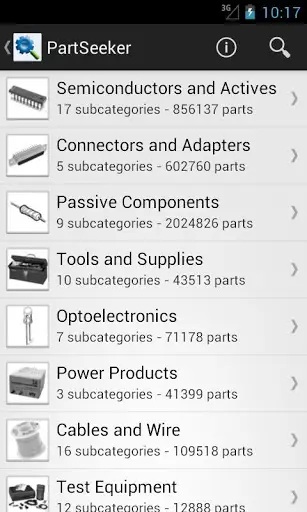
PartSeeker – is an app for searching electronic parts and components. Unfortunately this app is a paid one and the good side is that you can buy it for less than 2 USD. This app is made and released by the same company (IERO) which made ElectroDroid (see above) app. IERO has made this app by using the extensive component library of Octopart (the electronic component search engine). This app comes handy while you are away travelling and is keen to search for a component using your mobile device (may be smart phone or a tab!). 
Best and Free Android Applications for Electronics and Electrical Engineers
PIC Microdatabase - another free app from IERO, which integrates well with ElectroDroid app. This app is nothing more than a database of PIC micro controllers manufactured by Microchip. This app lists all PIC and dsPIC family of controllers in an easy to use user interface. Features and specifications of all controllers along with pinout diagrams of select ones are available. The most attractive feature is a search functionality in which you can search for a controller with particular features you would like to have.As an example you can search for controller from PIC that belongs to a particular PIC family like PIC 10, with specific EPROM values, specific RAM, USB 2.0 or higher, specific internal oscillator values  etc. The app will output all PIC controllers that matches your search criterias. So far more than 10,0000 users have downloaded this application.
Best and Free Android Applications for Electronics and Electrical Engineers
DroidTesla – is another free app for simulating electronic circuits. This SPICE simulation tool is quiet similar to the app “EveryCircuit” mentioned above in its functionality - means you can build and simulate a circuit. But they both (EveryCircuit and DroidTesla) differ in user interface and features provided. I found the free version of “EveryCircuit” much more appealing than DroidTesla. EveryCircuit has certain predefined circuits like halfwave rectifier, inverting amplifier etc which you can simply load to workspace and simulate in realtime. DroidTesla has given a list of examples in their free app version but none of them loads properly to workspace. The reason is most of the example circuits contain a particular component which may be available only on DroidTesla’s commercial version. User interface of  EveryCircuit is much better than that of DroidTesla. DroidTesla’s commercial version might be much better than EveryCircuits premium version, as DroidTesla has large set of component library to choose from. DroidTesla will definitely outshine EveryCircuit – if the number of component libraries available is taken into account. Both of the apps commercial versions are priced competitively. If “user interface” is your primary preference, I will recommend EveryCircuit premium. On the other hand, if number of component library is your first preference, I shall recommend DroidTesla commercial version
ElectronicsToolKit – is another free app which is a collection of simple tools like resistor color code calculator, series and parallel calculator etc. Almost all those tools are available in ElectroDroid app too, except for a Power Triangle calculator. I have listed this app here as it is free (and I have spent some time to download and test this app in my Galaxy) and you guys can try out, if you have time.More than 10,000 users have tried this application.
Best and Free Android Applications for Electronics and Electrical Engineers
AllDataSheet App – This app is free version of the Datasheet website Alldatasheet.com. This app is nothing more than a book mark to alldatasheet website’s mobile version. I dont recommend you to download this app as your purpose will be served by visiting Alldatasheet.com from your mobile browser (which will get automatically redirected to mobile version) 
EquivalentResistanceSolver – is another free app which helps you to calculate the equivalent resistance of a circuit. This app may not be that useful for a professional as the “user interface” is average. It takes lots of time to build a “Series-Parallel” combination. Might be handy for students who are learning about the concepts for the first time. 
RF Pad Calculator – is a free app that helps to calculate the resistor values required to build an RF attenuator. 
AmpliCalc - is a simple and free app to calculate inverting and non inverting operational amplifier values.
FilterCalc – is another free app from the same developer of Amplicalc, which helps to realize filter design by finding the appropriate values. 
ControlCalc – is yet another free app from the same developer of Amplicalc, which helps in simulating closed and open systems, calculate transfer functions, state response & you can save the output as PNG. 
M32 Assembly – is another interesting application which helps you to learn assembly language by yourself. This app infact is a simulator for the M32 processor.
Electronica – is another app which is open source (the source code of this app is available for free download). This app is also a collection of simple and easy to use tools that comes handy for an every day electronics enthusiast/professional or even a student.   
There are a handful of other free android applications like Ohms Law calculator, 555 Timer Calculator which I have not mentioned here. The reason is simple, most of the “electronics tools apps like ElectroDroid, Electronica, ElectronicsToolsKit etc has Ohms Law calculation, Resistor Colourcode calculation and 555 Timer calculator embedded in them!

Source:Circuitstoday.com

Page Rank

google pagerank

Write For Us

Submit a Guest Post

Find us on Facebook

Categories

555 Timer IC 7 segment Display 8051 Project AC Circuits Adafruit Alarms Amplifier Circuits Analog Circuits android Arduino arm processor Assembly Languange Atmel Atom Size Audio Circuits augmented reality Automotive Circuits avr Battery Circuits Bicycle Gurad bluetooth Cable TV Circuits Cambridge University Camera Technology Circuit Boards Clipping And Clamping Circuits Clocking And Timer Circuits Computing contact lens Contact Us Form Contests Controller Circuit Conversion Circuits Counter Circuits Digital Electronics diy circuits Downloads EFY EFYTimes Electronic Books Electronic Components Electronic Locks And Keys Engineering Fan Circuits Filter Circuits Fire Alarm free Frequency Fun And Game Circuits future Google Hack n Mod Ham Radio Circuits heart rate monitoring High Voltage Circuits Home Circuits IC Guide ieee Industrial Circuits Infrared Instructables Inventions ipad lcd Led Circuits Light Related Lighting Circuits Medical Circuits Meter Clocks Microcontrollers Microprocessors Mini Projects modules Movie maker NatGeo Navigation Notice Optical Fiber PC Circuits PCB Boards Physics pnp transistor Power Supplies Printing Projects Programmer Project Ideas Projectors Protection circuits Proximity Detectors Radar Radio Circuits Radio Transmitters Raspberry Raspberry Pie Remote Circuits Retis Lab RFID Robot Cars Robotics Science Science Alert Security And Safety Sensor Circuits Servo Motors Smallest Smartwatches sms Software solar cell sound application Spectram Switch Technology News Telephone Related Television Related Test And Measurement Circuits Thermal Projects Tone generator circuits Touch Screen Tutorials Wearables Wi-Fi Wireless
Like us on Facebook
Follow us on Twitter
Recommend us on Google Plus
Subscribe me on RSS